Friday, May 27, 2011

Propeller ADS7888 ADC driver

My Propeller Schmartboard and ADS7888 analog to digital converter had been collecting dust long enough.

And I was sick of the slow frame rate I was getting from my Game Boy Camera running off an Arduino. I thought a fast ADC and a more powerful MCU might help that. These were my good excuses to dive into the world of Propeller and write a driver object in Propeller Assembly.

Propeller, ADC, and lots of wires = fun
The Interface
The ADS7888 interface consists of an active low chip select (!CS), serial clock (SCLK) and serial data out (SDO). Dropping !CS initiates ADC conversion and clocks out the first of 4 leading 0's. The remaining three 0's followed by eight data bits with MSB first, are all clocked out just after the falling edge of SCLK. Raise !CS after the 12th bit for high throughput mode, and start all over again after a brief wait time.
Timing diagram from ADS7888 datasheet, 12-clock frame
The Process
So all I had to do is raise and lower pins and shift in data at the right times.  And the Propeller makes this really easy, thanks to deterministic timing. No interrupts and each instruction takes 4 clock cycles (with few exceptions that you can avoid or plan around).  So you can sync and run multiple cogs in lockstep.

I started by sketching out the instructions in Spin, then converting to assembly, learning on the fly. Propeller assembly strikes me as much easier to learn than others I've tried (6502, x86, VAX, ...)  I focused initially on just getting the right pins up and down in the right sequence. Then coded in the serial input. Then I added NOP instructions where necessary to ensure consistent SCLK periods throughout.

Tuning the Assembly Code
The total SCLK period was pretty long at this stage in development. Data acquisition is pretty tightly constrained by the Game Boy Cam's clock period of 2000ns so it was time to tune the code.

After finding the longest loop (serial shift in), I was able to reduce the number of instructions to 6 total (below) and removed NOPs elsewhere to reduce the SCLK period throughout.

:loop2        test sdo, ina wz ' SCLK down, data valid after 7ns
              shl data, #1     ' shift data left 1 bit
if_nz         or data, #%01    ' stick the next bit into data (or don't)
              nop              ' SCLK up
              sub j, #1 wz     ' deterministic timing
if_nz         jmp #:loop2      ' deterministic timing

I then moved initialization code into NOP slots later in the code to reduce setup time shortening the overall acquisition period.

Next I split the SCLK signal generation statements out to run in a separate cog, synchronizing with !CS using WAITPNE.

DAT RunClock
              org 0
clock         or dira, sclk1
mainloop      or outa, sclk1
              waitpne cs1, cs1   ' sync on !CS down
:clkloop      andn outa, sclk1   ' SCLK up
              test cs1, ina wz   ' if !CS high
              nop
              or outa, sclk1     ' SCLK down
if_nz         jmp #mainloop      ' if !CS high
              jmp #:clkloop
              
cs1     long  |< 3 ' ADS7888 !CS pin
sclk1   long  |< 5 ' ADS7888 SCLK pin

This shortened the SCLK period by two instructions yielding an acquisition period of about 975ns.  That leaves 1025ns of the Game Boy Camera's clock period free.  At 80MHz, that's 12.5ns per instruction, or 82 instructions per XCK period to store the pixel data in shared system memory, and maybe do something else with the data. In the same cog that's driving the camera, that is.

Meanwhile, several other cogs will be available, each with a full 2000ns (160 instructions) for each of the 15744 pixels, plus some idle time between frames to do some interesting processing. I suspect I'll be able to do some cool image processing as a result. Especially since the Game Boy Camera does on-chip edge detection.

I think it's safe to say I'll be able to do more than just detect candle flames by the time I'm finished, here. Including, I hope, obstacle avoidance, line following, even sidewalk/lane following. Who knows?

Source code is here.

Troubleshooting
I extensively used my trusty Hitachi V-1050F oscilloscope to check the consistency of the timing, and the timing of SCLK versus !CS.  The "B Display" feature magnifies and displays a small section of a longer waveform period. I could scroll through a long trace from beginning to end to ensure consistent timing between SCLK and !CS.

"B Display" shows a magnified window of a long trace

I hooked up a potentiometer as a voltage divider connected to VIN so I could check readings. The scope let me see the serial data coming out of the ADC, and I set up a wrapper program to send the ADC result over serial to the PC. I could verify that the serial data sent by the ADC matched the value read in by the software. Doing this caught a timing bug that dropped the LSB of the result.

%1001011 = 0x4b

I may double check the timing on all three pins at once with my HP 1650A logic analyzer if I can clear off my workspace.

Next Steps
Time to write a Propeller driver for the Game Boy Camera. I may have to combine the camera and ADC driver code for efficiency. My old digital logic text from college suggests that a ROM-based state machine might be the most efficient way to run the camera and ADC together. If I do that, it'll make a fun article. I'm considering experimenting with a parallel-interface ADC to further boost performance.

Friday, May 20, 2011

AVC Bot sees!

I'm still bummed about the result at the 2011 AVC (speakin of which, Sparkfun posted a video). Even with the head start I gave myself I guess it was just too much to tackle.

You may recall that the barrel obstacles in the 2011 Sparkfun AVC were red. I had been hoping that would be the case as I'd hoped all along to use computer vision for obstacle avoidance.

CMUcam test screen capture
Taking a lesson from my experiences with Pokey V2.0, even simple vision systems can simplify problems dramatically. Such as finding a candle flame. Or a giant red barrel so you know what direction to steer.

George M., one of my pals from SHARC, kindly loaned me a BOE-Bot CMUcam v1 and it was time to learn how it worked, interface it to the mbed, and then work out an algorithm to avoid giant red blobs in the robot's path.

I was able to get all the interfacing done in time, but ran into other issues. Here's the rundown.

Step 1: CMUcam Serial Interface

The CMUcam uses a simple, human-readable serial interface. You can use it from a terminal program like Termite. Or you can use their beta Java desktop application to do frame dumps (see pic, above right) and control other features of the camera.

Commands are terminated with a carriage return ('\r' for C/C++ people) and include things like RS for reset, TC for track color, MM for setting middle mass mode on/off, and myriad other commands.

Step 2: Arduino Control

The mbed on Data Bus has finally run out of serial peripherals: iGPS-500, AHRS, and the third USART is used for I2C instead of serial. That's for the compass

Anyway, with little time left, I decided to quickly make a Serial to I2C bridge with an Arduino-compatible ATmega328P. Controlling the camera over serial wasn't too difficult. I used NewSoftSerial for the camera and added an FTDI header for programming/debugging. I added several debugging features intended to save my bacon on race day.


From the PC I can monitor I2C activity, query the latest bounding box info, or even bridge the PC to the camera and control it with the CMUcam java app, all in-circuit and on-robot. It's really pretty neato.

The Arduino tells the camera to reset and track red blobs. It reads the reported x and y coordinates and sticks those in memory for access from I2C or serial.

There's also a watchdog that resets and reconfigures the camera if it stop spitting out color tracking packets for too long. It seems to work pretty well. All told, I'm pretty happy with how it all turned out.

Step 3: I2C Communication

On Arduino, I have had bad luck getting I2C to work. It's easier on the mbed, to be sure. The coding seems more intuitive to me than it did on the Arduino. So what better course of action than trying to get the two talking to each other?

Data Bus' mbed talking to breadboard Arduino talking to CMUcam
I had to refresh my knowledge of I2C protocol. I re-read the mbed Handbook on I2C and the Arduino Wire Library documentation. My first attempt failed miserably. Reluctantly, out came the ancient logic analyzer.

It was unhelpful until I remembered I was seeing a lot of data from the compass communication on the same I2C bus. Disabling that code helped. Then I read the part in the I2C tutorial that device addressing is 7-bit, with an 8th bit added as a read/write indicator.

On the Arduino I simply call Wire.begin(7), where 7 is the Arduino's I2C address. Then call Wire.onRequest() specifying a handler function that spits back 4 bytes, x1, y1, x2, and y2 for the bounding box.

I found it easiest on the mbed to use the "raw" I2C library's start(), write(), read(), stop() methods and manually setting the address. Take the I2C address, left shift once, and set bit 0 to indicate a read operation. Then read four bytes. Like this:

        cam.start();
        data[0] = (0x7<<1 | 0x01); // send address + !write = 1
        cam.write(data[0]);              // send address
        data[0] = cam.read(1);
        data[1] = cam.read(1);
        data[2] = cam.read(1);
        data[3] = cam.read(0);           // don't ack the last byte
        cam.stop();

Eureka, it works!

The logic analyzer shows the camera tracking a small red object on my desk.


Here's some screenshots of the serial interfaces I have going simultaneously. The mbed is in "instrument check" mode, reading and displaying sensor values.  You can see the box coordinates reported here.


The Arduino is in "standard" mode, after having been in "monitor" mode displaying i2c request events. The "q" command queries the current bounding box values; the same data the mbed's I2C query receives.


Step 4: The Hardware

The schematic and board are pretty simple. I'm basically copying the Solarbotics Ardweeny schematic, but using some SMD passives to keep the board uncluttered. The one through-hole resistor is convenient for single-layer routing.

Step 5: The Algorithm

In general the idea is to detect a big red object a few meters away and begin steering the robot so that the red blob isn't in the center of the image. The algorithm will have to pick a direction and either override, subsume, or trick the navigation steering algorithm to turn the robot.

Of course how far does the robot steer left or right? Imaginary parallel lines in front of the robot describe its track width. The robot, taking a picture, would see these lines converge to the vanishing point at the horizon.

I'll have to figure out what pixels these lines would occupy, and then steer the robot until the red blobs are outside of these track width lines (plus some safety margin).

Epilogue

I should've tested this right away and saved my time for fixing the navigation code.  For some reason every time the Arduino and CMUCam are powered up, the GPS signals tanked. The signals drop in strength by 30-50dB! In other words, the GPS fix goes from 9 satellites to 3 instantly. I ran out of time to investigate EMI/RFI as a possible cause. So Data Bus wasn't able to see red or anything else on race day. Maybe next year.

Friday, May 13, 2011

Choosing an MCU: ATmega, XMEGA, or ARM?

Oooo, lookit all the cool toys!
(see also: How to program an Atmel ATmega on Mac OS X)

I spent some time considering several microcontrollers as the brain of my Sparkfun AVC 2011 and 3rd place winning 2012 robot, Data Bus. I wanted to share some experiences and thoughts in the hope that it helps someone out there.

Each project is different with a unique set of goals. The key is to think about the goals and how well each option meets those goals. For example...

Goals

My primary goals were to save development time, and to support whatever level of computation required by the robot, and to provide interface flexibility in connecting myriad yet-to-be-chosen sensors. I wanted to keep costs reasonable. Sub $100 or ideally sub $50.

Options

I considered several options for the robot
  • Arduino-compatible: diy pcb, Arduino IDE; super-cheap!
  • An Arduino-flavored AVR XMEGA type thing
  • The Maple, ARM Cortex M3 from Leaf Labs; Arduino-like IDE
  • The mbed, ARM Cortex M3 from NXP: online; cloud-based IDE
  • Blueboard LPC1768-H, another Cortex M3; cheap!
  • Parallax Propeller
  • LPCXpresso, LPC1769, Cortex M3, cheap! (considered in 2012)
I could have, but did not, consider other powerful processors like Blackfin, PIC32, etc., or single board computers (too expensive for me at the time). Initially I considered using my Android cellphone until I realized it lacked all the IMU sensors necessary and I felt the development learning curve was too steep at the time. The Android development kit hadn't come out at the time, either.

Library support

Having a platform with good library support was crucial to saving time. I didn't want to have to develop a lot of libraries. Arduino is a good choice as it has such a massive following.

Most of the common sensors have libraries written. Initially the mbed seemed like it would have excellent library support. In fact I ended up writing and publishing most of the drivers myself, but I was easily able to adapt code from Arduino in a couple instances, and use a few existing libraries in other cases. It worked out ok.

Leaf Labs was an unknown but it was possible that much of the Arduino library code had been or could be easily ported.

The Blueboard... not so much. Probably would require custom coding top to bottom. Same for the LPCXpresso.

The Propeller generally has good community support with libraries. I would've had to write many myself and porting code would've been harder (unless I used the gcc compiler).

IDE

The IDE has an impact on speed of development. The Arduino IDE makes for writing small code quickly. Very complex code can be done... it can get a little messy. Ability to do version control is nice and provides a little freedom for moving the development environment from system to system. (I use Subversion with Google Code hosting).

The mbed IDE is nice in that I can develop on any system; I often would make code tweaks 'in the field' on the laptop. I didn't have to install yet another toolchain (I'm up to 6 or 7 now, I think?) and I could develop on any platform and just about any browser. Darned handy. And, the mbed environment now offers version control (as of 7/28/11). They are soon to add collaboration (as of 6/18/2012).

Less handy was trying to make code tweaks on race day with a poor WiFi signal. This was a problem in both years of the competition. Offline compilation is possible, now and I will explore that option, rest assured. It may also be possible to use mbed libraries on the LPCXpresso. Time for more research.

Peripheral support

The Cortex M3 has 4 serial ports, USB, CAN, multiple I2C, ethernet, and multiple SPI ports. Clearly the winner since I had I2C, two serial, and two SPI devices. I could've plugged the robot into a wireless AP and controlled it via web over WiFi had I wanted to.

The XMEGA has more peripherals so it might've been viable.

The Arduino Duemillanove, Uno, etc., based on ATmega328P are in a different (much lower) class, with only one of each peripheral. The Arduino Mega, based ATmega2560, would've provided more peripherals.

Processing power

The Arduino runs at 20MHz, the mbed, 96MHz, the LPCXpresso, 120MHz. The mbed has 32K of SRAM available, the Arduino 328P has 2K.  The mbed has 512K of program memory, the 328P has 32k.  The AVR is 8-bit the ARM is 32-bit.

I find myself frequently bumping limits with Arduino and often thinking carefully about memory and speed choices. With the mbed I simply ignored those concerns, wantonly declaring ints were chars would've sufficed, using floating point math with reckless abandon, declaring function-scoped arrays all over, and generally being sloppy with memory and performance. And it didn't matter. The Cortex M3 spent most of its time twiddling its thumbs and program and RAM were barely tapped.

Community support

The ability to find answers and solutions will dramatically speed development efforts versus having to invent the wheel all on your own.

I found most of the answers and help I sought for the mbed. The Arduino user base is obviously much, much larger, but mbed is fairly popular, it turns out. So this worked out well.

Summary

In short, of all the choices, the Cortex M3-based solutions were easy choices due to the massive number of peripherals and the significant computing power. The cost and completeness of the mbed solution made it the clear winner in the end. I migrated to it around January, about four months before the big competition and it carried Data Bus and I to a 3rd place in 2012 so overall, I'm very, very pleased.

I look forward to using the platform for other robotics and experimentation in the future.

Saturday, May 7, 2011

More Sparkfun AVC 2011 pics

Hard to believe it's only been a week.  Here's some more Sparkfun AVC 2011 pics my friend David G. took:


Friday, May 6, 2011

101 Tools for the Roboticist

A recent issue of Robot Magazine included a nicely done writeup on the merits of Oscilloscopes for robotics hobbyists. I totally agree.

The article got me to thinking about the tools I use. Not the obvious ones like Digital Multimeters or the cool ones like Bus Pirates or Logic Analyzers, but the tools that are indispensable yet are never the first to come to mind. They're the unsexy underdogs of the robotics hobby world...

001. Paper and writing utensil: Even after almost 2000 years, the convenience and immediacy of paper has yet to be surpassed. Having a big stash of scrap, blank paper and pencils/pens is awfully handy for capturing thoughts, doing calculations, drawing designs, drawing robots, and the like.  The key is having a stash you can grab from lickety split.

010. Laser Printer: I've used it to create PCB transfers, test PCB sizing, make hardcopies of various robotics and electronics information for quick reference, and generate templates for drilling/cutting robot chassis, among many other things. My old Laserjet 4m+ is an industrial strength workhorse and should last another 20 years without any trouble.

011. LEDs: Cheap, simple diagnostic tool, like an in-circuit logic probe. Throw one on the protoboard to make sure the power's on.  Throw one on a line that's supposed to be high.  Throw another on the motor when it's on or use dual color to show direction.

100. Cordless Drill: Great for driving screws for assembly/disassembly, drilling holes, chamfering or countersinking, can also use for twisting wires together (put one end in the vise, chuck the other end, and begin).

101. Flux: Even with the best iron, solder work/rework is going to be poor without flux, which allows molten solder to flow better. I'd rather have flux than a good iron. The best choice is a flux pen like ones from Kester, but Radio Shack flux paste, while messy, works and is good at sticking SMD parts onto PCBs.

Tuesday, May 3, 2011

Data Bus: The Nickle Tour

Data Bus, April 2012
Data Bus, is the 3rd place winner of the 2012 Sparkfun Autonomous Vehicle Competition (AVC) and veteran of the 2011 Sparkfun AVC. It is a mini, autonomous rover robot based on a 1:10 scale RC truck.

With only three sensors, a simple Kalman Filter, and a total cost of around $650, the robot was able to achieve a top speed of around 20mph, with a total raw time around the building of 37 seconds and a cross track error of ~1 meter (based purely on eyeballing it while chasing it several times around the SFE building in my WRX).


Data Bus mbed baseboards are now available on Tindie as a fundraiser


Here's the nickle tour of the robot, it's features, sensors, software, and more.

Chassis

Robotifying an RC Truck


The robot started as an ElectrixRC "Circuit" 1:10 stadium truck. At $130, it was the least expensive 1:10 RC truck I could find at my local RC Hobbies. It's not cheap, just a good value. It's tough, easily customized, good parts support, and has a loyal fanbase.

It runs a Tacon 3000Kv brushless motor, Hobbywing 35A ESC, 2.4GHz FlySky 3 channel receiver, and 2S, 4000mAH 25C Gens Ace LiPo battery, ElectrixRC 'hard' springs, and Traxxas Anaconda tires on 2.8" All Star black chrome wheels.

Suspension tuning completed the chassis work. I used 50wt oil in all four shocks, and adjusted ride height in back with springs inserted below the shock pistons. The result was a lower center of gravity and much flatter turns.

Brushless goodness
Body

The body is a Parma PSE "Skool Bus" lexan body custom painted by yours truly with custom decals printed on inkjet self-adhesive paper and coated with automotive clear coat.

Venus GPS
Sensors

Data Bus uses only three sensors. A Gyro, a GPS, and wheel encoders.

GPS

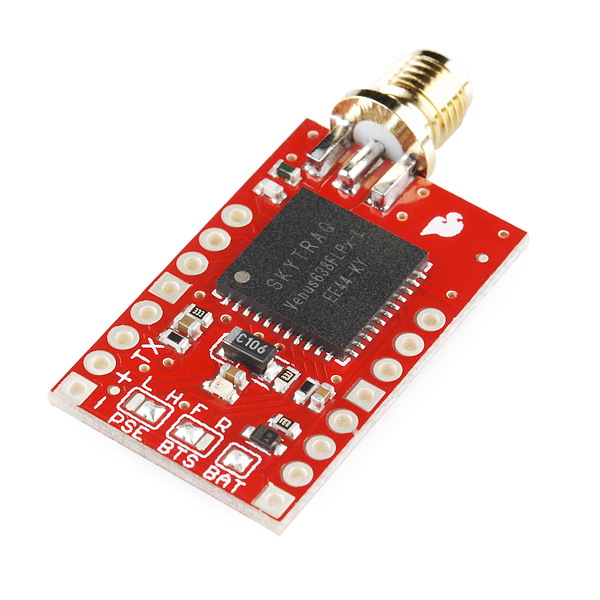
The GPS is a 20Hz Venus638FLPX on Sparkfun breakout board mounted inside with a roof-mounted patch antenna and a ground plane cut from a square of tin that's good for 5-10db signal gain.

Serial communication runs at 38400 bps on one of the mbed UARTs. GPS supplies heading information. The robot ignores GPS position information.

Gyro

Precision Gyro Calibration Reloaded

Additional heading information comes from an STM L3G4200D gyro on a Pololu minIMU-9, mounted on an aluminum bracket up front. Communication is via I2C at 400kHz. The gyro is sampled at 100Hz.

Encoders

Redesigned encoder board
AVC: Wheel Encoders
For Sale on Tindie

Wheel encoders on both rear wheels provides accurate distance measurement. The 32-stripe wheel encoder discs were created with my WheelEncoderGenerator cross-platform java application.

Sparkfun QRE1113 sensor boards mounted to the bearing carriers sense the stripes and send signals to a tiny surface mount interface board I redesigned using comparators in a Schmitt-trigger configuration.

Experimentation, Simulation, Analysis

Why The Wrights Flew First
Magnetometers and Motors
Magnetometer Calibration
Is a Compass Necessary?
Is a 3D Compass Necessary?
Magnetometer Calibration Error
Encoders and Quantization Error

I spent quite a bit of time testing, experimenting, understanding and modeling the error modes of the various sensors and their impact on position estimation error. All that up front work explains the unorthodox sensor choices, particularly ditching the compass and using only heading data from the GPS. Fortunately, all the work and the odd choices seemed to have been successful.

Naturally, the sensors are not of much use without a way to use them to estimate position and heading, aka pose.


Pose Estimation

Heading and Position Estimation

Heading is incredibly important in the Sparkfun AVC. An error of only a couple of degrees is the difference between crashing and finishing. The solution on Data Bus feeds lag-compensated gyro and GPS heading data into a Kalman Filter, using the results to update current heading and position with that historical estimate.

Gyro data is the foundation of the heading estimate. It's corrected for bias using heading data from the GPS. Unfortunately the GPS does its own massive amount of filtering and the result is a reduced dynamic range and lag.

What's Wrong With Data Bus?

By saving a second's worth of gyro data and feeding that into a Kalman Filter, a very good estimate is generated. From this, the gyro-based heading is updated. The end result is a heading estimate with high dynamic range and negligible bias.

Meanwhile distance traveled is given by the average distance of the wheel encoders. I calibrated the wheel encoders to Google Earth, my waypoint editor, and found the error falls below 1%. So the robot knows how far it's gone and in what direction, giving a position estimate. The position is estimated in cartesian coordinates which I did for one very good reason: updating the position based on the historical heading estimate.

If we know what direction we were pointing a second ago, we can not only update gyro heading calculations up to present, but, using a rotation matrix, we can update the last second's worth of position estimates up to present very quickly.

Microcontroller

Choosing an MCU
Brain Transplant and Updates

mbed on motherboard
The microcontroller is an NXP mbed, a NXP LPC1768 Cortex M3 running at 96MHz with 512KB flash, 64KB SRAM, and a plethora of I2C, ADC, UART, SPI and other peripherals. The mbed is mounted on a custom PCB fabricated at Bot Thoughts labs (a messy corner of our garage).

The ample computing power, flash memory, and available RAM open up possibilities that are simply unattainable on the typical 8-bit, low speed microcontroller.

The mbed incorporates a mass storage USB flash drive which stores the configuration file for the robot. The file contains waypoints, compass declination, magnetometer calibration, speed, turning parameters, GPS baud rate, and more. The configuration file saves time by avoiding recompiles.

User Interfaces

Data Bus Interfaces and Conveniences

Sparkfun Serial Graphic LCD user interface
The robot features two primary time-saving interfaces. The first is a serial, menu-based interface accessible through the built-in USB to serial adapter on the mbed.

The menu gives access to instrument diagnostics, software reset, a unix-like shell for managing and downloading log files, a bridge to raw GPS output to permit PC client software to directly configure the GPS, output for AHRS visualization, Mavlink data output for use with a Ground Control Station, and more.

Secondly, the robot features an onboard interface consisting of a Sparkfun 128x64 graphical LCD display and 3 buttons on the Bus body. Status information is displayed and various calibration functions are available. Most importantly, this is the interface used to tell the robot to start racing.

Data Logging

Logging Data to SD Cards

Data is logged as text CSV to an onboard FAT-32, 2G microSD card connected to one of the mbed SPI ports. Around 20 system state values are logged at a rate of 50Hz and typically take no more than 150usec to write but the logging is buffered and done in the non-time critical outer loop. Logfiles are named with sequential numbers.

Offline analysis scripts in Processing, perl, and Octave plot and visualize the sensor data, or prepare KLM files for display in Google Earth. The onboard shell command 'send' in combination with a customized Java serial terminal program initiates on-the-fly download of logfiles.

Power Supply

Lots and lots of wires...
The main electronics power supply is a Pololu 5V, 3.5A step-down (buck) switching regulator fed by the same battery powering the ESC and RC receiver. The mbed's onboard 3.3V regulator supplies power to all the 3.3V circuits.

Wiring

All the wiring uses 0.1" pin headers and crimped and soldered female connectors on custom cables, all consistently color coded to eliminate race day goofs. I've learned that loose connections and rats nests of wiring suck, so I made a concerted effort to keep things somewhat organized underhood.

Printed Circuit Boards

Eagle board and circuit files, etc.

Because it's fun and because I hate breadboards for anything but prototyping, all the custom circuits are implemented on custom board designs. Two boards were professionally fabricated through the DorkbotPDX PCB service; the rest were etched at home.

For an added touch of elegance, I emblazoned each of the homebrew PCBs with a Bot Thoughts logo using the toner transfer method for "silk screening"  After transfering the toner, each board is sprayed with clear acrylic for a pseudo-professional look. Each board carries an OSHW logo as well as the entire robot is open source.

Safety

Robot Kill Switch

An RC switch (multiplexer) circuit based on designs online enables me to take control of the robot within a few milliseconds at any time by switching on the remote control transmitter. Control was returned to the microcontroller by switching off the transmitter.

The circuit takes pulses from the receiver and pumps up a capacitor, reaching a voltage that then controls a 74HC244 bus driver acting as a multiplexer.

The circuit is populated onto a custom PCB created at Bot Thoughts labs.

Software

mbed code
Data Bus Code Repository
Ranger Board Software
Analysis Software
Ground Control Software (such as it is...)

The software onboard DataBus is written in a mix of C and C++ in the mbed cloud IDE and tallies up to almost 20,000 lines at last count. The mbed libraries abstract interfaces to the microcontroller peripherals (Serial, I2C, ADC, etc.)  I reused as much code from others as I could.

For example, I did a custom port of TinyGPS to mbed parses NMEA data from the GPS and provide methods for polling the availability of new GPS data. GGA and RMC sentences are parsed, only. I reused others' sensor libraries where I could. Most of the code base for Data Bus was developed last year by me.

Analysis

First Autonomous Runs
Visualizing Position

This year, most of the effort went towards improved sensors and revised position and heading estimation software. To that end, quite a bit of additional software is written in Perl and Octave to process and analyze logs from the Bus. A Processing program does simple visual playback of data runs, and this program was adapted as a rudimentary simulation program.


2012: What Worked, What Didn't

2012 Sparkfun AVC Recap

Well, obviously on the final run, things worked fine. :) A fact which has me probably more relieved and thankful, than anything else. :) But lots didn't work in the days and hours prior to the final successful run. I very nearly blew it more than a few times.

Several estimation improvements were required for race day. Three days before the race, the robot couldn't get around the building more than once in five times, usually slowly drifting into curbs, and whatnot. All seemed lost until some log analysis turned up two problems. The third issue didn't rear its head until race day.

First, the steering system on my cheap RC truck was too loose. The robot was making fine adjustments to heading that were having no effect on the steering system. A couple of modifications tightened the steering and revealed another problem. The heading estimate was just bad enough to send the robot into curbs.

The GPS heading estimate started out wrong at the start of each run and took about 3 or 4 seconds to converge. I changed the code to ignore the GPS heading estimate for awhile. Then, I initialized the Kalman Filter with the calculated heading between the starting waypoint and the next waypoint.

While the robot waits on the starting line, it is assuming the heading is, say, 90.5° and the Kalman Filter basically unbiases the gyro in that time. Thursday night testing was like watching a miracle. The robot was going around the building with eerie consistency and at impressive speeds! It was incredibly exciting to watch!

On race day, first run, Data Bus took off and steered into a wall. The heading was all over the place right after taking off. Bouncing off the starting line ramp was enough to jostle the gyro and send the heading estimate all over the place. My attempt at a fix failed in the second run. The robot veered left into the crowd.

The third attempt, thanks to Ted (team Daisy Chain) for the elegant suggestion, was to start off going slow off the ramp then punch it. In that run, the robot tracked beautifully around the building, made a picture perfect jump over the ramp, and landed about 2' from its intended stopping point.


2011: What Worked, What Didn't

2011 Sparkfun AVC Recap

Disastrous Dead Reckoning
Data Bus crashed in every one of its three heats in 2011. I'd consider that a fairly epic FAIL.

Why? Sensor errors baffled and delayed me, and I wasn't able to figure out a sane way to fuse the data. The robot had no clear idea where it was or where it was pointed. No wonder it crashed.

I had quickly gotten overwhelmed by all the sensor issues. I fought in vain to get correct and consistent compass heading data, reliable, reasonably accurate GPS data, and usable gyro heading information. On top of this, all attempts at implementing reliable obstacle detection, with several sensors, resulted in failure. Without detection, avoidance was impossible.

Having a poor idea where it was pointed and no idea if it was about to run into anything was bad. But on race day, I now believe I didn't give the GPS enough time to acquire a good signal so it also didn't really know where it was.

I now have a much better understanding of the quirks of the various sensors, and what really works and really doesn't work. Real world testing has been encouraging but there's still a lot of work ahead to make the most of the usable data and increase speeds to competitive levels without giving up accuracy or precision.


One minor victory in 2011 was that Data Bus was designed to be weather resistant with sensors and electronics mounted inside or within weather-resistant housings. On that snowy, rainy day in April 2011, I was one of the few robots that didn't need to be wrapped in plastic bags. It's electronics were safely warm and dry, ready to consistently drive the robot into walls.


Some other minor successes from 2011 include data logging, steering, user configuration, and hardware/electronics. This year, data logging helped in prototyping estimation algorithms on the PC.

The steering algorithm is similar to what's called a pure pursuit algorithm. Essentially it's a feedback control where relative bearing to the waypoint is the error and steering angle is the output. The algorithm calculates the desired turn radius to intercept a point at a fixed distance towards the waypoint.

User configuration via a configuration file has been helpful. It allows me to change waypoints, steering, throttle, navigation and other parameters on the fly without recompiling the software.

Except for a loose GPS connection that plagued me for about a month, the electronics and hardware have been pretty reliable. I'm pleased and relieved to be able to focus on software and algorithms more than electronics.

While I got a few things right, mostly I failed to put it all together in 2011.


Data Bus Teaser, 2012


Official Entry Video for 2012


Official Entry Video for 2011